How to Update Your Password on Deepaiges
If you suspect your password has been compromised or simply want to strengthen your account security, follow this simple process to update your password.
Steps to Update Your Password
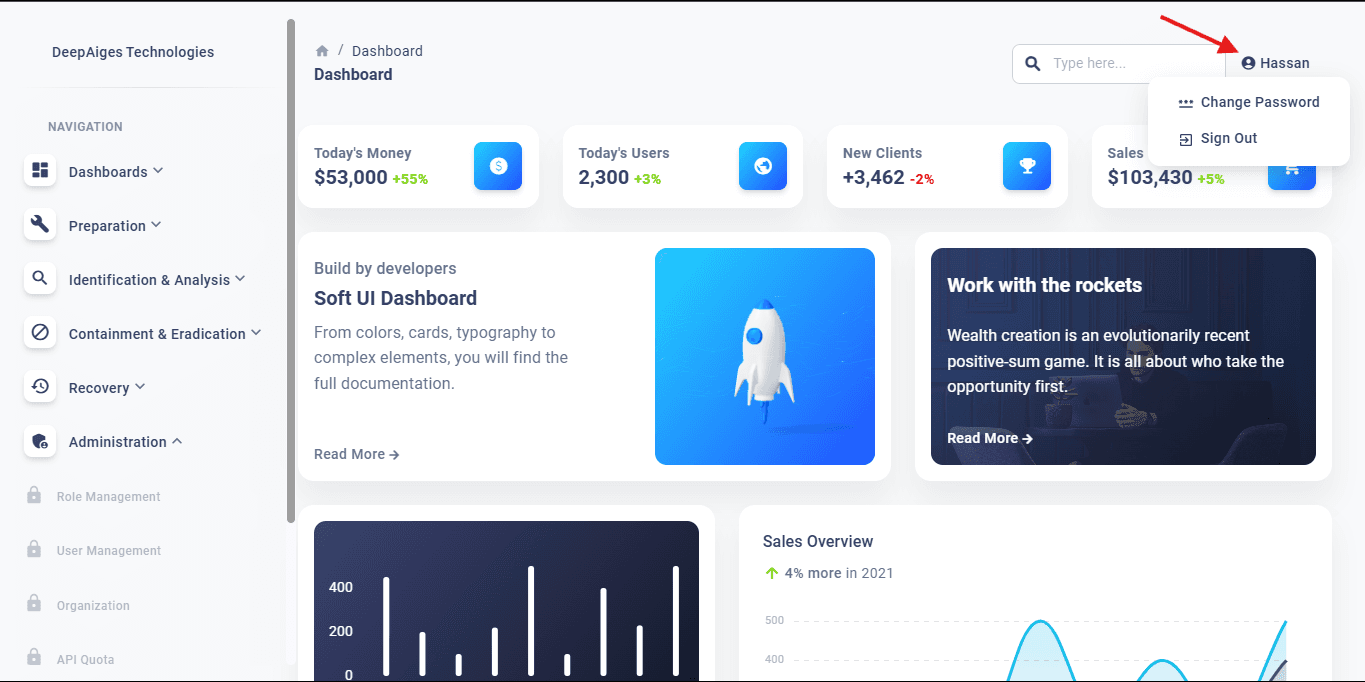
- Navigate to the Deepaiges Dashboard .
- Log in and ensure you are on the main dashboard screen.
- Click on your profile name in the top-right corner.
- From the dropdown menu, select Change Password.
- Enter your current password.
- Input your new password and re-enter it to confirm.
- Click Save Changes to finalize your update.
What to Do If You Forgot Your Password
If you’ve forgotten your current password, refer to the How to reset your password in User Management Section.
Tips for a Strong Password
- Use at least 12 characters, including uppercase, lowercase, numbers, and special characters.
- Avoid common words or predictable patterns like “password123”.
- Update your password regularly to maintain security.
🛡️ Security Note: Never share your password and always log out from shared or public devices.
By following these instructions, you can ensure your Deepaiges account remains secure and protected.