How to Assign Permissions to Users
Assigning permissions to users in your organization is a straightforward process. Follow the steps below:
Prerequisites
Before assigning permissions, ensure that:
- You are the admin of your organization.
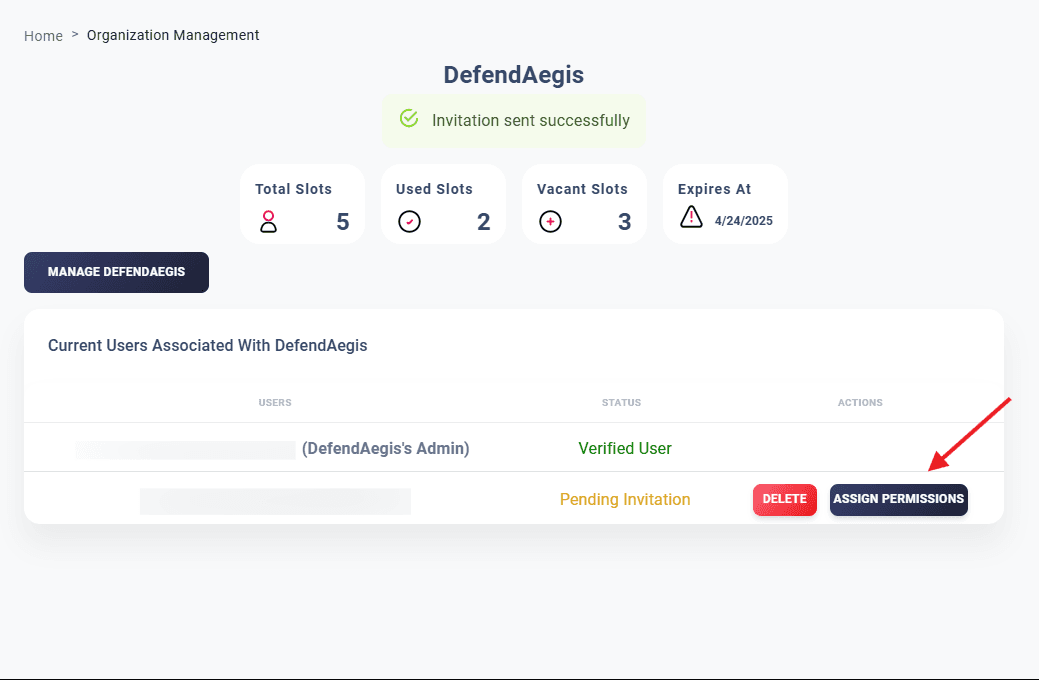
- You are in the Organization’s Section under Administration.
Steps to Assign Permissions
Navigate to the Organization’s Section
Go to Administration → Organization. Here, you will see a list of users in your organization, along with their email addresses and statuses.
Select Permissions
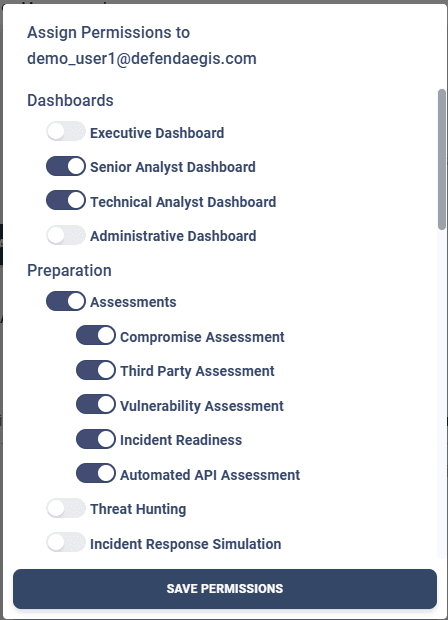
A list of permissions will appear. Select the permissions you want to assign to the user.
For example, the user demo_user@defendaegis.com has been granted:
- Senior Analyst Dashboard and Technical Analyst Dashboard in the Dashboard section.
- Access to all branches in the Preparation section.
Click on “Save Permissions”
Once the required permissions are selected, click on the Save Permissions button.
Notes
- Permissions control the user’s access and functionalities within your organization.
- Review assigned permissions periodically to ensure proper access control.
🛡️ Security Tip: Assign only the permissions necessary for the user’s role to maintain security and operational efficiency.