How to View and Filter Audit Logs on Deepaiges
Audit logs play a crucial role in monitoring user activity and ensuring organizational security. Follow these steps to access and filter audit logs effectively.
What Are Audit Logs?
Audit logs are records that document every successful or unsuccessful login attempt made by users. These logs help track and monitor login activities within your organization, providing valuable insights into system usage and potential security threats.
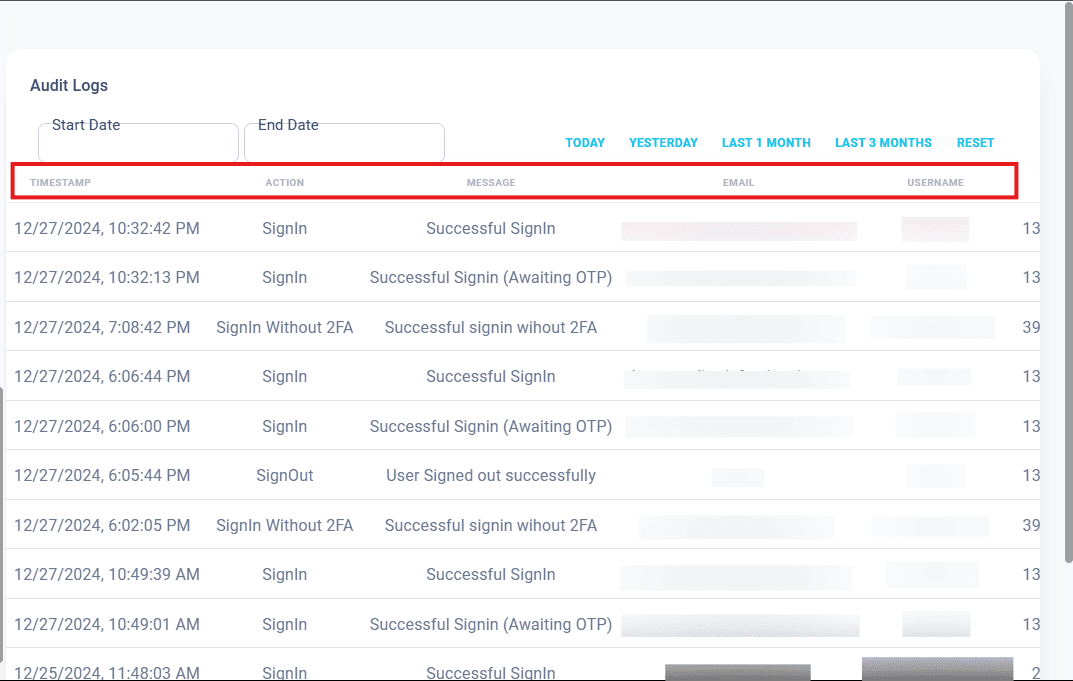
If you have the required permissions, Deepaiges allows you to view the following details in the Audit Section:
- Timestamp: The exact date and time of a login attempt.
- Action: Specifies whether the user signed in or signed out.
- Message: A brief description of the operation.
- Email: The email address of the user attempting to log in.
- Username: The user’s account name within the organization.
- Example: A unique identifier assigned to each user.
- IP Address: The Internet Protocol address of the device used for login.
- Example:
192.168.1.1(helps identify the device location).
- Example:
- User Agent: Information about the device or system used to log in.
- Example:
"Windows 10, Chrome Browser".
- Example:
By understanding these fields, you can efficiently monitor user activity and detect anomalies.
How to Filter Audit Logs
Deepaiges offers powerful filtering options to streamline your search for specific login records. You can filter logs by:
- Date Range: View logs from a specific start to end date.
- Quick Filters: Select predefined periods like:
- Today
- Yesterday
- Last 1 Month
- Last 3 Months
Resetting Audit Logs
If you wish to clear all existing audit logs, you can do so by clicking the Reset button.
⚠️ Important Note: Resetting audit logs will erase all records permanently. Ensure you back up necessary data before proceeding.
Pro Tip: Regularly review your audit logs to identify unusual login attempts or unauthorized access, ensuring the security of your organization.
By following these instructions, you can leverage the Audit Section on Deepaiges to maintain a secure and well-monitored environment.